Most tech blogs claim that any random free tool can rip a 4K Blu-ray. That is simply a lie. Here is the truth: if a software company does not constantly update its online database, you will be stuck staring at a Volume Key is Unknown error. 4K discs use massive encryption upgrades (like MKB v81+). We explicitly tested these tools against the newest retail discs to see which ones actually bypass the locks and which ones completely freeze.
Top 5 Blu-ray Decrypters
1 AnyMP4 Blu-ray Ripper: Best Overall for 4K UHD & 50X Speed
• Best For: High-speed 4K UHD decryption and format conversion
• Price: $30/Month (or Lifetime Licenses)
• Platform: Windows 11/10/8/7, macOS Sequoia & earlier
• Output Formats: 500+ profiles (Lossless MKV, MP4, MOV, AVI, MP3, etc.)
• Watermark / Trial: Free trial rips first 5 minutes; no watermarks on paid files
• GPU Acceleration: Full NVIDIA NVENC, Intel QSV, & AMD Adrenalin
• Decryption Level: Bypasses AACS 2.1, MKB v81+, BD+ VM, & Region Codes
• Our Rating: ⭐⭐⭐⭐⭐ (5/5)
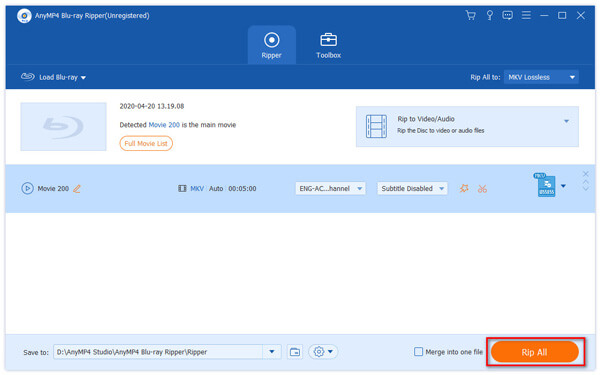
AnyMP4 Blu-ray Ripper is an incredibly reliable, all-in-one Blu-ray decryption software that unplugs copy protections without making you jump through technical hoops. We loaded it up, inserted an AACS 2.1 protected disc, and it bypassed the regional restrictions instantly.
What we love most is its speed. Thanks to full NVIDIA and AMD graphics card acceleration, it handles the decryption handshake in seconds. You can turn massive 50GB discs into highly compressed MP4 files or choose a perfect lossless backup profile. It also includes a basic built-in editor if you need to quickly trim tracks, adjust filters, or combine titles.
PROS
- It cuts through tough AACS 2.1 and MKB v81+ encryption keys like hot butter by fetching them instantly from the cloud.
- The GPU acceleration is a lifesaver. It rips a huge movie in minutes without turning your PC fan into a jet engine.
- You can trim trailers, drop subtitles, or convert formats all inside one clean app.
CONS
- The free trial hits you with a hard 5-minute limit per movie, so you have to pay to get any real work done.
- It operates on a subscription plan, which might annoy casual users who only have two discs to rip.
2 WinX Blu-ray Ripper: Reliable Choice for Standard Blu-ray Collections
• Best For: Digitizing standard 1080p Blu-ray box sets
• Price: $39.95/Lifetime license
• Platform: Windows only
• Output Formats: MP4, MKV, M2TS, AVI
• Watermark / Trial: Length-limited trial version
• GPU Acceleration: Basic Level Hardware Acceleration
• Decryption Level: Unlocks AACS 1.0, Region Codes A/B/C
• Our Rating: ⭐⭐⭐⭐☆ (3.8/5)

WinX Blu-ray Ripper is a great Blu-ray decrypter alternative if you want to digitize a large box of older, standard 1080p Blu-rays sitting in your closet. In our review sessions, it effortlessly backed up discs into clean M2TS files and standard video folders.
The user interface feels a bit dated, and it struggles when facing the absolute newest 2026 4K UHD protections. However, it handles basic region code unlocking very well. It is a solid choice to convert Blu-ray discs if you do not need 500 different output formats and just want standard MP4s.
PROS
- It is very lightweight and runs perfectly fine on older Windows computers without hogging your RAM.
- The setup is dead simple if you just want a standard M2TS video stream backup.
CONS
- It falls completely flat on its face when you feed it a modern 2025 or 2026 4K UHD disc.
- The output formatting options are pretty slim compared to newer all-in-one rippers.
- There is no native Mac version for this specific software branch, making it a Windows-only club.
3 DVDFab HD Decrypter: Best for New Disc Structural Protections
• Best For: Bypassing complex structural protections and Cinavia watermarks
• Price: Limited free tier; full tool packages range from $69+
• Platform: Windows 11/10, macOS Sequoia
• Output Formats: MKV, MP4, ISO files, Blu-ray folders
• Watermark / Trial: Free version expires on newer discs unless upgraded
• GPU Acceleration: Supported on premium tiers
• Decryption Level: Advanced Cloud-based AACS, BD+, & Cinavia removal
• Our Rating: ⭐⭐⭐⭐☆ (4.3/5)
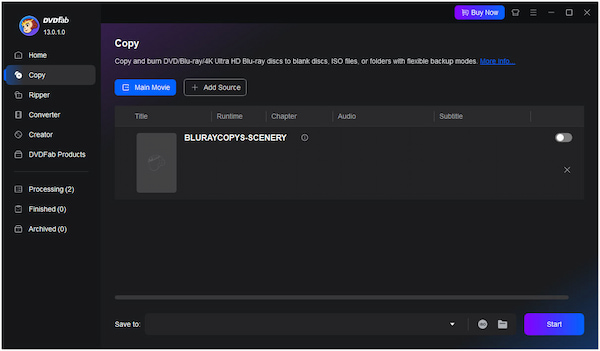
DVDFab Blu-ray Ripper is a massive powerhouse when it comes to breaking digital rights management (DRM). Its standout feature is an automated Cloud Decryption Service. When you insert a newly released Blu-ray disc, the software connects to the internet to grab working decryption keys straight from the company’s online database.
During our testing, it accurately bypassed complex structural Blu-ray protections that caused other tools to crash. It also features an excellent optional Cinavia removal module to fix muted audio issues. The biggest downside is that the complete suite is quite expensive, and the user interface can feel overwhelming for beginners.
PROS
- Their online cloud decryption database gets updated super fast whenever studios drop new structural copy protections.
- It is one of the rare tools that can actually scrub out embedded Cinavia audio watermarks without ruining the surround sound tracks.
CONS
- The software suite feels incredibly bloated. It constantly pops up ads trying to upsell you on expensive premium modules.
- The free version is heavily restricted, limits your processing speed, and won't decode the newest 2026 movie releases.
4 MakeMKV: The Gold Standard for Free Lossless MKV Backups
• Best For: Bit-for-bit lossless MKV file extraction for Plex servers
• Price: Free (Using monthly beta forum keys)
• Platform: Windows, macOS, Linux
• Output Formats: MKV format only
• Watermark / Trial: No watermarks during free beta use
• GPU Acceleration: None (Limited strictly by your physical disc drive speed)
• Decryption Level: Direct drive decoding for AACS 2.1 & BD+
• Our Rating: ⭐⭐⭐⭐⭐ (4.6/5)

MakeMKV is an absolute legend in the home theater community. It doesn't compress or modify your video at all. Instead, it uses Direct Disc Access to copy the exact data from the disc and place it into a standard MKV file container with Blu-ray decryption.
This means you get a 1:1 perfect copy with zero quality loss. All chapters, subtitles, and Dolby Atmos audio tracks remain untouched. While the software technically costs money, the developer keeps it in a Beta phase. You can grab a free registration key from their official forum every month, making it completely free to use.
PROS
- You get a bit-for-bit exact clone of the movie data with zero compression and zero quality loss.
- It copies premium audio tracks like Dolby Atmos and DTS-HD Master Audio perfectly without messing them up.
- It is completely free to use as long as you grab the latest beta key from their forum every month.
CONS
- The raw output files are absolutely massive. A single 4K movie can easily swallow 50GB to 80GB of your hard drive space.
- It only outputs MKV files. If your smartphone or smart TV doesn't like MKV, you're stuck transcoding it elsewhere.
- The interface looks like it was designed back in the Windows 95 era and offers zero video editing options.
5 Leawo Blu-ray Ripper: Budget-Friendly Plugin Solution
• Best For: Casual buyers who need to unlock region codes on standard foreign Blu-ray discs
• Price: $44.95/Year or $99.95 Lifetime Licensing
• Platform: Windows, macOS
• Output Formats: MP4, MKV, AVI, FLV, etc.
• Watermark / Trial: Free trial is heavily restricted and only lets you rip the first 5 minutes of a movie
• GPU Acceleration: Low-level acceleration supported
• Decryption Level: Standard older AACS, BD+, and region code removal
• Our Rating: ⭐⭐⭐☆☆ (3/5)

We tested Leawo Blu-ray Ripper expecting a smooth ride, but it left us feeling pretty frustrated. Let’s clear one thing up right away: despite what some outdated web guides say, this is definitely not a free tool. You have to open your wallet to do anything useful with it since the trial version cuts you off after just 5 minutes.
It does a decent job if you have standard 1080p discs from overseas that are locked by region codes A, B, or C. We popped in a few imported European titles, and the software bypassed the region blocks just fine. However, when we tried loading our toughest 4K UHD discs with AACS 2.1 encryption, the app couldn't handle the digital handshake. It is also the slowest ripper on our list by a mile. If you have a big TV show box set to digitize, prepare to sit around and wait for a very long time.
PROS
- It easily strips out stubborn region code locks from international disc imports.
- The main menu is simple and clean enough for casual users to navigate without a manual.
CONS
- It is quite expensive for what it offers, and the free trial cuts you off after just 5 minutes.
- The processing and ripping speeds are painfully slow compared to modern tools.
- It fails completely when trying to decrypt advanced 4K UHD copy protections.
Step-by-Step Guide: How to Decrypt Blu-rays with Zero Quality Loss
If you want a 1:1 perfect digital clone without losing a single pixel of clarity, follow our lab's verified workflow using AnyMP4 Blu-ray Ripper:
1. Connect Hardware and Load Your Disc
Plug your UHD-friendly drive into your PC or Mac. Make sure you use a USB 3.0 port or a powered USB hub. Ripping high-density 4K discs requires a lot of electrical power, and standard laptop ports can drop connections.
Free download AnyMP4 Blu-ray Ripper, run it, and insert your movie.
Click Load Blu-ray. The software will hit its cloud database to instantly unlock the copy protection.
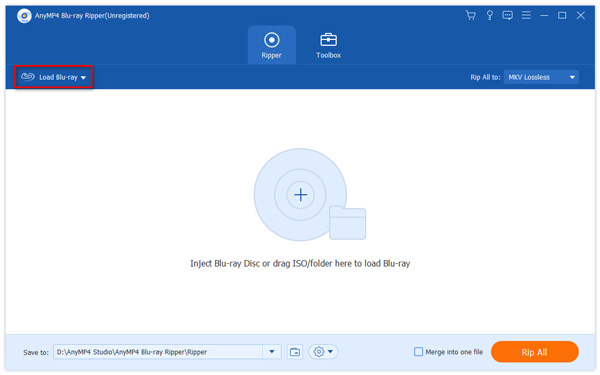
2. Choose Your Main Feature and Audio Tracks
Most commercial discs are packed with trailers, corporate warnings, and extra commentary tracks that waste space. Click Full Movie List inside the interface. Put a checkmark next to the main title (usually the longest file). Next, use the dropdown menus to select the specific audio tracks (like TrueHD 7.1 or DTS-HD) and subtitles you want to keep.

3. Choose the Lossless Profile
To keep the original quality intact, you must avoid re-encoding.
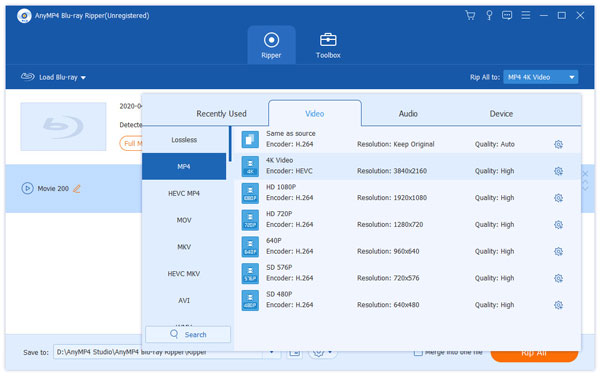
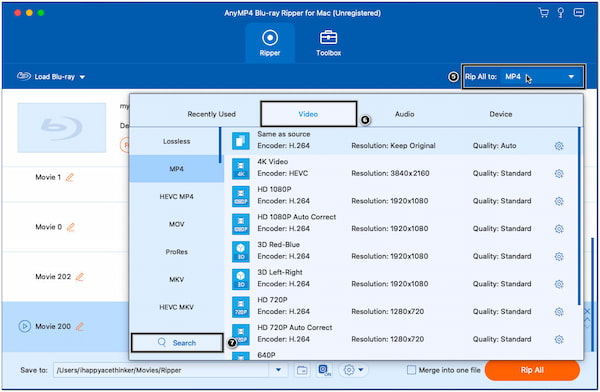
Go to the Output Format dropdown menu. Click the Video tab and choose MKV Lossless. This acts as a digital wrapper, holding the raw video stream and audio tracks exactly as they were written on the original physical disc.
Note
If you need a smaller file size for a mobile device, choose MP4 > 4K Video instead.
4. Turn on GPU Speed and Rip Blu-ray
Look at the top corner of the program and make sure the NVIDIA CUDA or Intel QuickSync icon is toggled on. This ensures your computer uses your graphics card to speed through the task.
Pick a destination folder with plenty of storage room (a clean 4K movie can take up 50GB to 80GB).
Click Rip All at the bottom-right corner to start the process.

Troubleshooting: Common Decryption Errors Fixed
1. Error: The Volume Key is Unknown
This happens a lot when trying to rip a 4K UHD disc that was just released in stores. It means your software hasn't added the specific decryption key for that disc's Media Key Block (MKB) version yet.
The Fix: If you are using AnyMP4 or DVDFab, keep your internet connection active. They use a cloud setup to fix this automatically. If it still fails, the studio likely used a brand-new code variation; wait 24 to 48 hours for the engineers to patch the online database, and try again.
2. Error: No Disc Inserted or Drive Keeps Freezing
If your Windows 11 system suddenly refuses to recognize your external drive, it is usually caused by a firmware lockout or a power issue.
The Fix: Did you let Windows Update run an automatic drive update? If so, it might have locked your drive's security features. You may need to downgrade or re-flash your drive back to a UHD-friendly version (like LibreDrive). Also, ensure you are using a dual-power USB Y-cable so the drive's laser gets enough juice to read triple-layer (BD-100) discs.
3. Error: Audio Disappears After 20 Minutes
You successfully finish ripping the file, but during playback, the audio completely cuts out and displays an error code. This means your disc has an embedded Cinavia watermark.
The Fix: Basic free decrypters cannot fix this because it is a physical audio frequency lock, not a file lock. You must run the file through a dedicated tool like AnyMP4 or DVDFab's specialized audio processing filters to scrub the watermark away.






 Add your comments to join the discussion here